CVM Unable To Boot After AHV Upgrades

Introduction
This week, during some routine maintenance upgrades for a customer, I experienced a very odd scenario where the CVM was unable to boot after the host was rebooted due to AHV upgrades.
The issue
After the 3rd host in the upgrade cycle, I noticed the LCM was taking surprisingly long, and I had the feeling something was off. Very shortly afterward, I was being greeted with this error message, stating LCM timed out due to being unable to communicate with the CVM and its services after the grace period.
The error message we were seeing was the following one:

This error seemed very familiar to me from some previous issues, and thus I had a gut feeling I knew what the issue would be.
So I logged on to a CVM in the cluster to validate the status and could see one of the CVMs was still down, as seen below.
nutanix@NTNX-XXXXXXX-A-CVM:A.A.A.A:~$ cs | grep -v UP
2026-05-18 11:39:36,490Z INFO MainThread zookeeper_session.py:272 cluster is attempting to connect to Zookeeper (unestablished session (object 0x7f6c7f68c520)), host port list zk2:9876,zk3:9876,zk1:9876
2026-05-18 11:39:36,490Z INFO MainThread patterns.py:63 Creating a new instance for ZookeeperSession[('client_id', None), ('connection_timeout', None), ('host_port_list', 'zk2:9876,zk3:9876,zk1:9876'), ('use_zk_mt', None)]
2026-05-18 11:39:36,491Z INFO Dummy-1 zookeeper_session.py:933 ZK session establishment complete, session 0x39e3a7b63070334 (object 0x7f6c7f68c520), negotiated timeout=20 secs
2026-05-18 11:39:36,495Z INFO MainThread cluster:3607 Executing action status on SVMs X.X.X.X,Y.Y.Y.Y,Z.Z.Z.Z,A.A.A.A,B.B.B.B,C.C.C.C
The state of the cluster: start
Lockdown mode: Disabled

        CVM: X.X.X.X Down

        CVM: Y.Y.Y.Y Up

        CVM: Z.Z.Z.Z Up

        CVM: A.A.A.A Up
2026-05-18 11:39:37,377Z INFO MainThread cluster:3771 Success!

        CVM: B.B.B.B Up

        CVM: C.C.C.C Up, ZeusLeader
nutanix@NTNX-XXXXXXX-A-CVM:A.A.A.A:~$
This confirmed my assumption, so I SSH'ed towards the host where the CVM was down and validated its status.
I could see the host only had a very short uptime, which makes sense, since it just got rebooted for performing the AHV upgrade.
nutanix@NTNX-XXXXXXX-A-CVM:A.A.A.A:~$ ssh root@A.A.A.A
Nutanix AHV

Nutanix AHV is a cluster-optimized hypervisor appliance.

Alteration of the hypervisor appliance (unless advised by Nutanix
Technical Support) is unsupported and may result in the hypervisor or
VMs functioning incorrectly.

Unsupported alterations include (but are not limited to):

- Configuration changes.
- Installation of third-party software not approved by Nutanix.
- Installation or upgrade of software packages from non-Nutanix
  sources (using yum, rpm, or similar).

Notice: SSH will no longer be available in upcoming releases.
        Nutanix Support may access the bash shell on an exceptional
        basis.
[root@AAAAAAAA-01 ~]# uptime
 11:41:00 up  1:56,  1 user,  load average: 11.31, 11.62, 11.88
[root@AAAAAAAA-01 ~]#
When I checked the CVM's state, it was shown as “shut off”, which indicates the CVM was unable to boot for some reason.
[root@AAAAAAAA-01 ~]# virsh list --all
 Id   Name                                   State
-------------------------------------------------------
 2    afa176c8-8953-4123-9590-6790b1df8c0c   running
 3    a183952f-493f-4aa8-a9e4-0320250aa03f   running
 4    ffd39a74-7f25-4727-b599-ce3b36ed804a   running
 5    d6e6fe0d-2357-414d-82e1-4064bfb5a894   running
 -    NTNX-AAAAAAAA-01-CVM                   shut off

[root@AAAAAAAA-01 ~]#
I gave it a shot, trying to manually turn on the CVM, but this just threw an error message at me about a certain PCI device missing.
[root@AAAAAAAA-01 ~]# virsh start NTNX-AAAAAAAA-01-CVM
error: Failed to start domain 'NTNX-AAAAAAAA-01-CVM'
error: Hook script execution failed: internal error: Child process (LC_ALL=C PATH=/usr/local/sbin:/usr/local/bin:/usr/sbin:/usr/bin /etc/libvirt/hooks/qemu NTNX-AAAAAAAA-01-CVM prepare begin -) unexpected exit status 1: [Errno 2] No such file or directory: '/sys/bus/pci/devices/0000:16:00.5/driver_override'

[root@AAAAAAAA-01 ~]#
With this behavior and similar experiences from the past, I was now 100% certain where this was heading towards.
This issue is being described partially in the Nutanix KB-7154. Moreover, this KB points to the fact that a certain PCI device is missing or not correctly mapped towards the CVM to enable it to boot.
When checking the PCI devices on the problematic host and a working host of the same model, we could clearly see the issue now.
Problematic host:
[root@AAAAAAAA-01 ~]# lspci | grep -i  'Intel Corporation Volume Management'
64:00.5 RAID bus controller: Intel Corporation Volume Management Device NVMe RAID Controller (rev 04)
e2:00.5 RAID bus controller: Intel Corporation Volume Management Device NVMe RAID Controller (rev 04)
Working host:
[root@BBBBBBBB-01 ~]# lspci | grep -i  'Intel Corporation Volume Management'
16:00.5 RAID bus controller: Intel Corporation Volume Management Device NVMe RAID Controller (rev 04)
64:00.5 RAID bus controller: Intel Corporation Volume Management Device NVMe RAID Controller (rev 04)
e2:00.5 RAID bus controller: Intel Corporation Volume Management Device NVMe RAID Controller (rev 04)
[root@BBBBBBBB-01 ~]#
As we can observe, one of the PCI devices is indeed missing on the problematic host.
This was in fact the culprit, preventing the CVM from correctly booting and thus blocking our upgrade halfway.
The fix
When looking a bit further in the KBs and documentation, we found KB-16037 which is pretty similar to the previous KB we saw.
The KB suggested doing a simple host reboot to see if the PCI device would reappear first.
Since the CVM was already powered off due to the issue, the reboot would be pretty simple.
- Place the problematic host in maintenance mode using the following command
nutanix@NTNX-XXXXXXX-A-CVM:A.A.A.A:~$ acli host.enter_maintenance_mode X.X.X.X- To check the AHV version of the hosts and determine which hosts we could migrate the VMs to, you can leverage the following command.
nutanix@NTNX-XXXXXXX-A-CVM:A.A.A.A:~$ hostssh "grep 'VERSION=' /etc/os-release"Next, we need to determine which VMs are still residing on the problematic host so we can manually migrate them to the compatible hosts. For this, you can utilize the following command on the problematic host itself.
[root@AAAAAAAA-01 ~]# virsh list --all --title
 Id   Name                                   State     Title
----------------------------------------------------------------------------------------
 1    NTNX-AAAAAAAA-01-CVM                   shut off
 2    d6e6fe0d-2357-414d-82e1-4064bfb5a894   running   xxxxx-yyyyy-t-zzzzz-worker-aaaaaa
 3    ffd39a74-7f25-4727-b599-ce3b36ed804a   running   xxxxx-yyyyy-t-zzzzz-infra-aaaaaa

[root@AAAAAAAA-01 ~]#- Next, after confirming there are no VMs left on the host, retry entering maintenance mode with the previously issued command. To validate the host is in maintenance mode, one can use the following command.
nutanix@NTNX-XXXXXXXX-A-CVM:B.B.B.B:~$ acli host.list
Hypervisor IP  Hypervisor DNS Name  Host UUID                             Node state              Connected  Node type       Schedulable  Hypervisor Name  CVM IP
A.A.A.A     A.A.A.A           38bf4003-22f8-46c1-8ef2-ca961ea8ec8d  AcropolisNormal         True       Hyperconverged  True         AHV              A.A.A.A
B.B.B.B     B.B.B.B           bb246dc3-bced-4b05-a423-31b39a395c39  AcropolisNormal         True       Hyperconverged  True         AHV              B.B.B.B
C.C.C.C     C.C.C.C           8ee2071a-e7d6-4816-b86a-88788da7edbe  EnteredMaintenanceMode  False      Hyperconverged  False        AHV              C.C.C.C
D.D.D.D     D.D.D.D           f56564ad-040a-4cf1-904c-a6bce16f12c7  AcropolisNormal         True       Hyperconverged  True         AHV              D.D.D.D
E.E.E.E     E.E.E.E           8b0cd6a3-2b61-4216-9fc0-ae088768e38a  AcropolisNormal         True       Hyperconverged  True         AHV              E.E.E.E
F.F.F.F     F.F.F.F           89c67bd5-77dc-4489-9765-214aa8364e23  AcropolisNormal         True       Hyperconverged  True         AHV              F.F.F.F
nutanix@NTNX-XXXXXXXX-A-CVM:B.B.B.B:~$- Once the host successfully entered maintenance mode, we could proceed with rebooting the host.
However, after rebooting the host, we were still missing the PCI device.
This brought me to the next step, attempting a clean shutdown of the host, waiting several minutes, and then powering on the host again from scratch.
Since the host was still in maintenance mode, we could immediately proceed with this.
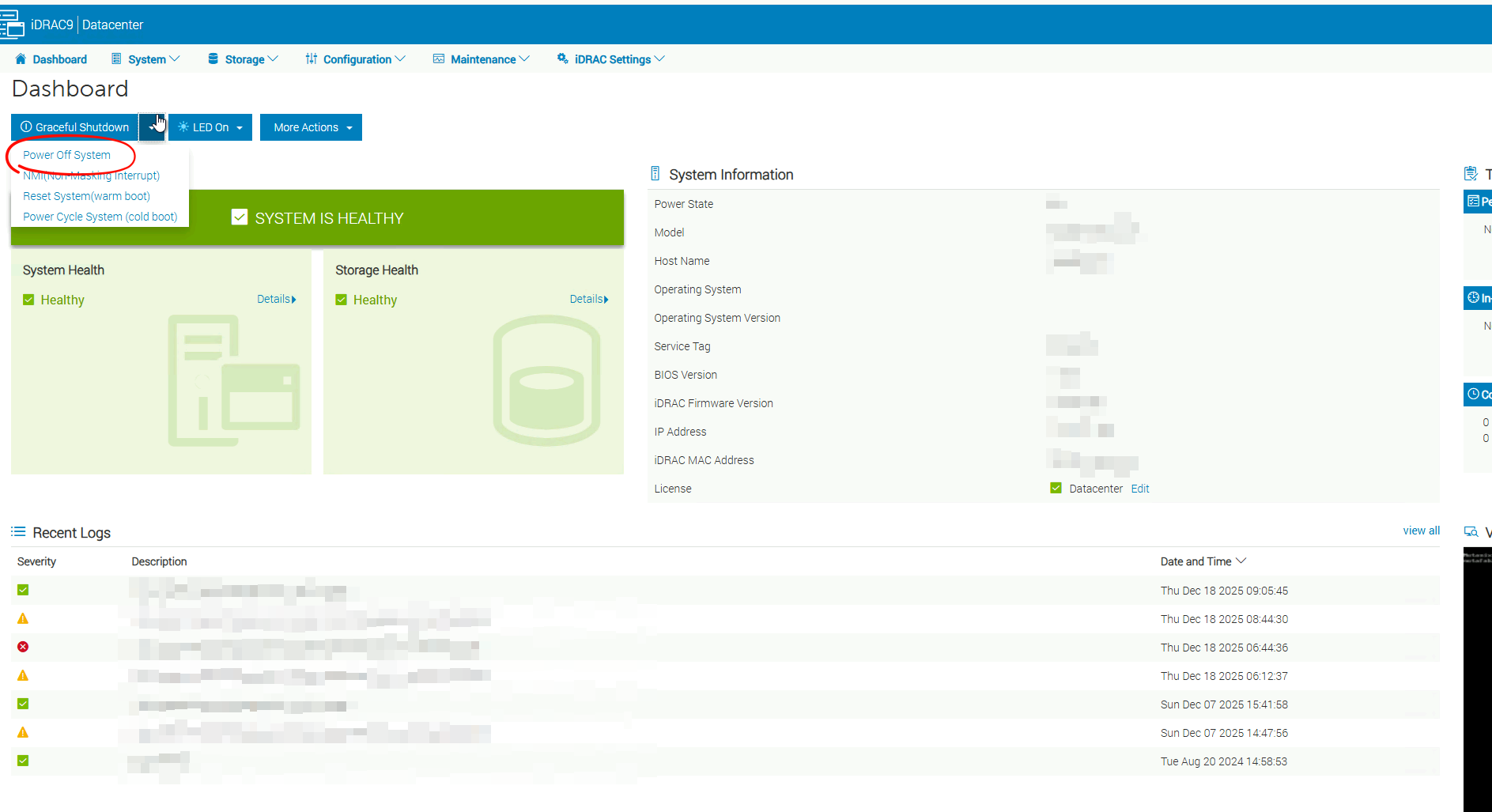
In our case, the server was a Dell server, so we went to the OOB interface, iDRAC in this case.
From there, we could power off the server, as seen in the print screen below.
After waiting roughly 5 minutes, we powered on the server again and waited for it to complete booting.
And eventually, we could see the PCI device did reappear, and the CVM already successfully booted on its own 🥳
root@AAAAAAAA-01 ~]# lspci | grep -i  'Intel Corporation Volume Management'
16:00.5 RAID bus controller: Intel Corporation Volume Management Device NVMe RAID Controller (rev 04)
64:00.5 RAID bus controller: Intel Corporation Volume Management Device NVMe RAID Controller (rev 04)
e2:00.5 RAID bus controller: Intel Corporation Volume Management Device NVMe RAID Controller (rev 04)
[root@AAAAAAAA-01 ~]#
Next, we just needed to exit the host from maintenance mode using the following command.
nutanix@NTNX-XXXXXXX-A-CVM:A.A.A.A:~$ acli host.exit_maintenance_mode X.X.X.XNext, we could see UVMs landing on the host again and the CVM being operational again.
[root@AAAAAAAA-01 ~]# virsh list --all --title
 Id   Name                                   State     Title
----------------------------------------------------------------------------------------
 1    NTNX-AAAAAAAA-01-CVM                   running
 2    d6e6fe0d-2357-414d-82e1-4064bfb5a894   running   xxxxx-yyyyy-t-zzzzz-worker-aaaaaa
 3    ffd39a74-7f25-4727-b599-ce3b36ed804a   running   xxxxx-yyyyy-t-zzzzz-infra-aaaaaa

[root@AAAAAAAA-01 ~]#
Lastly, verify that the cluster is fully operational again and all CVMs are reachable, as seen below.
nutanix@NTNX-XXXXXXX-A-CVM:A.A.A.A:~$ cs | grep -v UP
2026-05-19 17:16:47,402Z INFO MainThread zookeeper_session.py:272 cluster is attempting to connect to Zookeeper (unestablished session (object 0x7faf95cfb520)), host port list zk3:9876,zk1:9876,zk2:9876
2026-05-19 17:16:47,403Z INFO MainThread patterns.py:63 Creating a new instance for ZookeeperSession[('client_id', None), ('connection_timeout', None), ('host_port_list', 'zk3:9876,zk1:9876,zk2:9876'), ('use_zk_mt', None)]
2026-05-19 17:16:47,404Z INFO Dummy-1 zookeeper_session.py:933 ZK session establishment complete, session 0x29e3a5e71782631 (object 0x7faf95cfb520), negotiated timeout=20 secs
2026-05-19 17:16:47,408Z INFO MainThread cluster:3607 Executing action status on SVMs X.X.X.X,Y.Y.Y.Y,Z.Z.Z.Z,A.A.A.A,B.B.B.B,C.C.C.C
The state of the cluster: start
Lockdown mode: Disabled

        CVM: X.X.X.X Up

        CVM: Y.Y.Y.Y Up

        CVM: Z.Z.Z.Z Up

        CVM: A.A.A.A Up

        CVM: B.B.B.B Up

        CVM: C.C.C.C Up, ZeusLeader
2026-05-19 17:16:48,225Z INFO MainThread cluster:3771 Success!
nutanix@NTNX-XXXXXXX-A-CVM:A.A.A.A:~$
And there you have it, the issue is resolved.
I hope this post can be helpful to some of you, and if there are any suggestions or questions, do not hesitate to reach out to me on my social media channels at the bottom of my blog.